-
Click the Start button.
-
Select Settings, and then Control Panel.
-
In the Control Panel window, double-click the Display icon
 .
. -
In the Display Properties dialog box, click the Settings tab.
Industry Mall Online User Guide
This web site is best viewed if your PC monitor screen is set with a resolution of 1024 x 768 pixels.
To change the MS Windows screen resolution on your PC:
Click the Start button.
Select Settings, and then Control Panel.
In the Control Panel window, double-click the Display icon .
In the Display Properties dialog box, click the Settings tab.
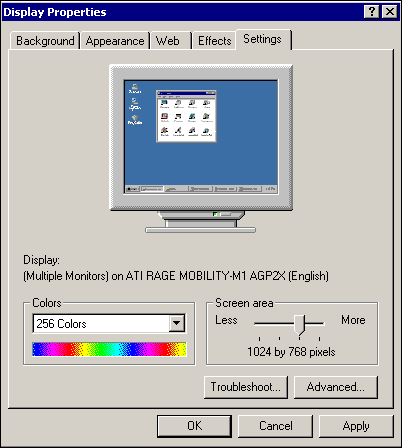
In the Screen area on the tab, slide the arrow to the right until you see 1024x768 pixels.
Click OK to close the Control Panel.
Note: You may need to restart your computer for this change to take effect.